

The full answer
Your circle is your keyholder first, then up to three supporters, and each person’s row says only the role: Your keyholder or Supports you. You support has one row for each person whose protection you can see, with their state, such as Protection on and their days. A row somebody is waiting on comes first in its group, in red, and the badge on the tab counts them. Rows describe what the server holds; nothing on one can change your protection.
Two groups, one list
The page is titled People, and on your own protected account a plus sits at the top right. Above the list, the people who have accepted walk toward you. Your circle holds one keyholder and up to three supporters, four places in all. You support holds the people whose protection you can see, and a line under it says whose key you hold.
With nobody on either side, the page reads Nobody here yet, Invite someone you trust to support you, with an Invite a supporter button. Somebody who supports others and has no protection of their own sees only You support, with no plus, and a quiet Start your own protection at the foot.
What a row can say
A row in Your circle is a face, a name and the role, and your keyholder’s face carries a key. It never carries a status: a request to end protection shows on Today and on its own pages, not here. Beside the settled rows, Your circle can show:
- Asked to hold your key or Asked to support you, in red and first, is somebody whose yes is waiting for your answer. Tapping it opens their ask, with Accept and Not now.
- Invitation sent, dimmed, is an invitation from before Fold’em 3.0 that is still out. Its page has Send the link again and Cancel invite.
- Said no or Invite ran out, dimmed, is an invitation that closed. It opens nothing, and Clear removes it.
- Waiting for a name, then Ready with a day, under the person taking over, is a key handover started before Fold’em 3.0. Your keyholder’s row still reads Your keyholder, because the key is still theirs.
A row in You support says how that person is doing, in the words everyone who supports them sees: Protection on with their days, Not confirmed yet, Protection at risk, Protection off or Protection ended. When they need you, the row comes first in red: Asked for support with a time, Asked you to end protection, or Asked you to end Lockdown. An ask you sent that is still waiting reads Waiting for them, dimmed, and Up to date as of a time shows when what you see is old.
The badge on the tab counts the rows waiting on your answer. While a request to end protection is open, while a handover runs, while an ask waits for you, or once every place is taken, the plus is greyed out and VoiceOver reads why: Not while a request to end protection is open, Not during a key handover, An invitation is already pending, Your circle is full.
Rows that leave
Removing somebody removes their row, and nothing is drawn in its place. A closed invitation stays, dimmed, until you clear it or two weeks pass. There is no list of finished processes here: the tab shows the people with you now, and each person’s History holds what passed between you.
Reading the page
-
Nobody yet
With nobody on either side, the page is one line and one button, Invite a supporter, which opens the same sheet as the plus. Nothing connects until the other person says yes in their app and you accept their ask.
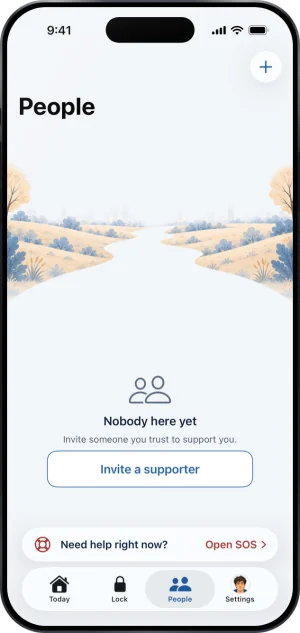
People, with nobody in it
-
Your circle, then You support
Your keyholder comes first with a key on their face, then your supporters, each with their role. With no keyholder, Your circle simply holds your supporters, and the plus is there to invite one. Below, You support lists the people whose protection you can see.
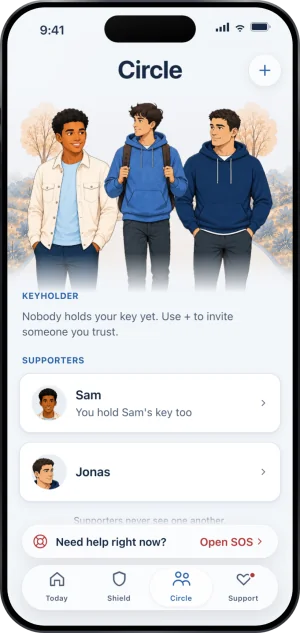
No keyholder
-
A person’s own page
Tapping a row opens the person, titled with their name, with Edit at the top. Under their face it says how you are connected, such as Your keyholder since a day. Then Message and Call, or Add number if you have saved none. For someone in your circle, What they see follows: Your gambling free days, Shared or Not shared, and Your requests, Always. History lists what passed between you. Edit is where a number is added and where removing them lives.
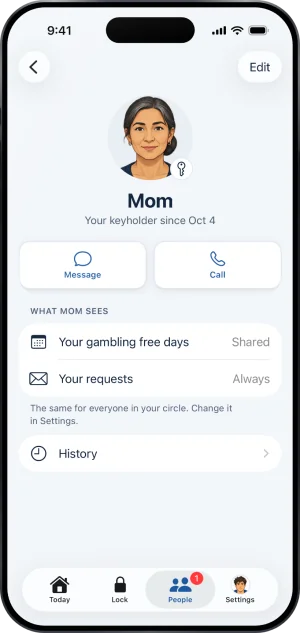
One person
Offline, and the first open
The saved people always draw. With no connection, the line Offline. Showing what was saved. sits at the top and every saved row still opens; answering an ask, sending a nudge and stepping away wait for the connection. The only time the tab shows nothing is the first open, before anything has been saved: it reads Loading your people, and if that first load fails it says Could not load your circle and offers Try again.
What this does not do
A row is a description, never a control over enforcement. Nothing you tap on People changes your block, your protection or any wait; the rows report state the server holds, so a row cannot make something happen and cannot make something stop. Nothing in Your circle shows a keyholder or a supporter anything: it is your side of the same facts, and what they see is a separate and shorter list.
Write to us and a person reads it. We answer within two working days, and we would rather hear the question twice than not at all.