

The full answer
Tapping it asks Apple whether the Apple ID signed in on this phone already holds a Fold’em subscription, and reinstates it if so. It is never a second charge, and the app short circuits the paywall on its own when it already reads an active entitlement, so you cannot be billed twice by accident. It only ever finds a purchase made on the same Apple ID, because that is the whole of what Apple will tell it.
What restoring asks for
A Fold’em subscription belongs to the Apple ID that bought it, not to the app install and not to your Fold’em account. Restoring is the app asking StoreKit for the current entitlements on the Apple ID signed in to this phone, and accepting the answer. If a live subscription comes back, the app treats the phone as entitled from that moment. If nothing comes back, a line says so: No active subscription was found for this Apple Account. If you paid with another Apple Account, sign in to the App Store with it and restore again.
The app also asks this question without being told to. A device that already reads an active entitlement short circuits the paywall rather than showing it, which is what stops a returning user paying twice. Blocking is put back in place against that same live reading, never against a purchase record the app keeps for itself.
When you need it
Three situations produce a phone that is paying but not entitled.
- A new phone, where the subscription is on the Apple ID and the fresh install has not asked yet.
- A reinstall of Fold’em on the same phone.
- And a sign in on a second device with the same Apple ID.
In all three the fix is the same tap, and in all three the rest of your account, your protection, your day count and your circle come back from the server independently of it.
A fourth situation looks the same and is not: a subscription that genuinely ended. Restoring cannot revive a subscription that has lapsed or been refunded, because Apple has nothing live to hand back. What that phone needs is a new purchase, and the app offers exactly that rather than a restore that would fail.
Why a cold app stays blocked
Fold’em treats an unreadable entitlement as blocked, never as free. An app that has never synced, one that is offline, and one that hit a StoreKit error all hold the block in place and show Restore rather than dropping the shields. Only a successful check that comes back with no subscription at all is read as ended, and even then the phone drops nothing itself: the server releases the block 72 hours after the subscription ended, unless it is restored. Restoring is therefore the safe action in every one of those states: at worst it changes nothing.
The two places it lives
-
On the paywall
Restore is one of the links across the foot of the paywall, with Terms, Privacy and, until a code is applied, Invite code. This is the one to use if you have reinstalled and the app is asking you to buy something you already own.
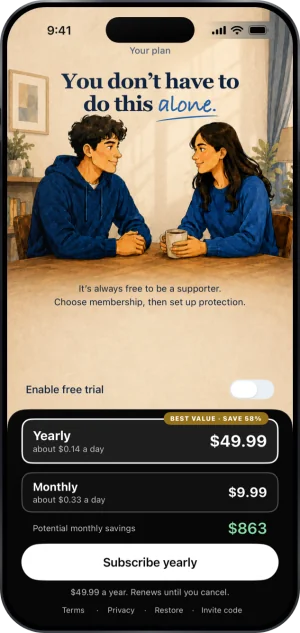
Restore, at the foot of the paywall
-
In Settings, under Subscription
Open the Settings tab and tap Subscription. Restore purchases sits under Manage subscription, and tapping it asks Apple at once. A live subscription comes back as Purchases restored. If Apple has nothing to hand back, the line under the row reads No active subscription was found for this Apple Account. If you paid with another Apple Account, sign in to the App Store with it and restore again. If the App Store cannot be reached, it says so and your purchases are unchanged. While a payment is due, the Subscription row opens Resolve payment instead, which carries the same Restore purchases.
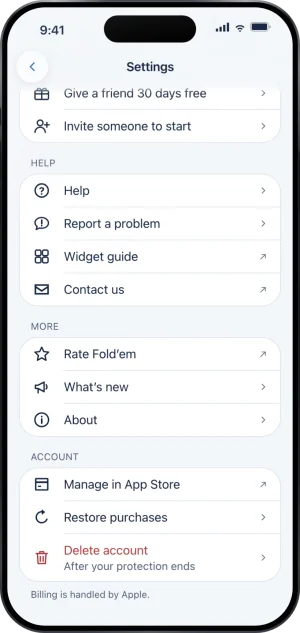
Settings, with Account at the foot
What this does not do
Restoring does not move a subscription between Apple IDs, and it cannot find a purchase made on an account you are no longer signed in to; only the person holding that Apple ID can restore it. It is not a way to recover a refunded or expired subscription, and it does not open anything: the block is held by the server and, if you have one, your keyholder, so a phone that restores an entitlement returns to being protected, not to being open. It also has nothing to do with signing in to Fold’em itself, which is a separate account with its own row.
Write to us and a person reads it. We answer within two working days, and we would rather hear the question twice than not at all.