

The full answer
Open Settings in Fold’em, tap Subscription, then Manage subscription, which opens Apple’s own manage subscriptions sheet where you can cancel renewal or switch plan; a refund is asked of Apple through your purchase history, under Apple’s refund rules. None of the three ends your protection at once. Cancelling renewal stops the next charge and leaves the block where it is until the subscription runs out. If your subscription ends, protection stays on for 72 hours, then ends unless the subscription is restored.
Apple holds the billing
Fold’em sells its subscriptions through StoreKit, so the whole of billing belongs to Apple: the charge, the renewal, the plan change, the receipt and the refund. The app is told one thing and one thing only, which is whether a subscription is currently active. It never receives a card number, a billing address or a payment method, and it cannot cancel, charge or refund anything on your behalf. The footer on the Subscription page in Settings says exactly this, in five words: Billing is handled by Apple.
There is no cancel button inside Fold’em, and its absence is not an oversight: a subscription a self exclusion app could cancel for you would be a subscription it could also silently drop.
Cancelling, and what it does not do
Cancelling turns off automatic renewal. The subscription keeps running to the end of the period you already paid for, and blocking is untouched for the whole of it. When the paid period finally ends, the entitlement stops being active and the lapse window opens on the server: 72 hours later, and not before, the server releases the shields. From the moment the subscription ends, the people in your circle who use the app are told your protection is ending, never why, and their card for you reads Protection at risk, then Protection ended once the shields come off. A keyholder who joined by email gets a letter that says the subscription ended. That is the mechanism, and it is described in full in the lapse article.
Cancelling never ends your protection while the paid period runs, and it never counts as a request to end it. Your protection and the subscription are separate, but protection needs the subscription: once it has run out, protection stays on for 72 hours and then ends unless the subscription is restored. If what you actually want is to stop the block, the honest path is a request to end protection: your keyholder decides if you have one, and a wait follows either way.
Changing plan
Apple's manage subscriptions sheet lists the two Fold’em subscriptions, monthly and yearly, and lets you move between them. Upgrades and downgrades, their proration and their timing are Apple's rules and Apple applies them. Fold’em learns only the result, at the next check of your entitlement, and nothing about your protection, your day count or your circle changes when a plan does.
Refunds
Fold’em cannot issue a refund, because it never received the money: Apple processes the subscription and Fold’em never sees your payment details. A refund is therefore asked of Apple, through your Apple ID purchase history, and Apple's refund rules decide it. If Apple does grant one, the app finds out the same way it finds out about any other ending: the entitlement stops being active, and the release follows the same 72 hour lapse window as a subscription that simply ran out. A refund does not end protection quietly either: if someone holds your key, the server still tells them that protection ended.
Getting to Apple's sheet
-
Open the Settings tab
Subscription and Account share a group, above Help. While you are subscribed, the Subscription row names your plan, Monthly or Yearly.
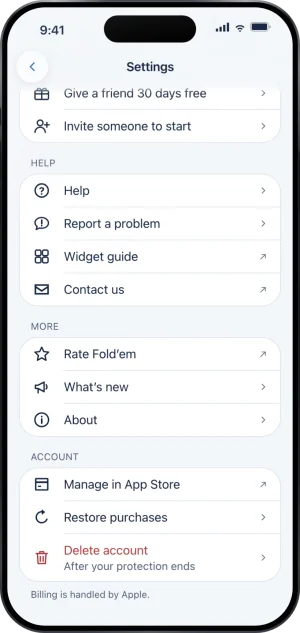
Settings, with Account at the foot
-
Tap Subscription
The page holds Manage subscription and Restore purchases, and under them the line that names the owner of everything above: Billing is handled by Apple. While a payment is due, the row says so under its title and opens Resolve payment instead, which carries Manage subscription too.
-
Tap Manage subscription
Apple's own manage subscriptions sheet opens over the app. Cancelling and switching plan both happen inside it, in Apple's words, and Fold’em never sees what you chose. Closing the sheet returns you to Settings.
What this does not do
Cancelling does not open the apps while the paid period runs, and it does not delete your account or your data: those are a separate row and a separate flow. Fold’em cannot cancel for you and cannot refund. It reads whether Apple says the subscription is active or has ended, and tells you when protection ends if it has. It also cannot stop your keyholder being told when protection ends, whatever the reason it ended.
Write to us and a person reads it. We answer within two working days, and we would rather hear the question twice than not at all.