

The full answer
You can ask at any moment, but the server will not finish it while protection is still enforceable: deletion is never faster than ending protection, so your protection has to end first, either through a request to end it or through a lapse release. A deletion asked for while protection is running is scheduled instead of refused, and it completes on its own about 30 days after protection ends. Cancelling a scheduled deletion is one tap, with no sign in and no wait.
Why it waits
Deleting an account removes the record that protection exists. If that were allowed while protection is running it would be ending protection under a different name, and far more quietly than a request to end it. So the rule is a single sentence, checked on the server inside the same transaction that would do the deleting: enforceable protection blocks deletion.
The screen never lies to you about which state you are in. It asks the server, then says which state you are in, protection still running, a request to end protection already open, records the server will not act on, or ready to finish now, and offers only the action that fits it.
The two ways through
If your protection is still running, you have the same two doors you always had, and they are the doors on this screen. Ask to end protection… opens the ordinary request: your keyholder decides if you have one, and the ordinary wait follows. Or Schedule deletion files the request now and leaves it standing: the block keeps running, and about 30 days after your protection ends a server sweep finishes the deletion without you touching anything. If a request to end protection is already open the screen simply says so, offers Open your request, and deletion follows whenever that request closes, one way or the other.
Cancelling stays easy
A scheduled deletion is a flag on your account, not a countdown you have to beat. The screen that shows it carries a line saying what it is waiting for and a button reading Cancel scheduled deletion, and that button is one tap: no confirmation, no code, no sign in. The friction in Fold’em is always on the way out, never on the way back.
What finishing removes
Confirming is deliberately slow. The screen lists what will go, states that it cannot be undone, offers Keep my account as the big first button, and puts the destructive action last as a slider you have to drag. While your subscription can still charge, it also says that deleting your account does not cancel it, and offers Manage subscription. Sign in with Apple confirms it, and your Apple sign in token is revoked as part of the same act. If deleting fails partway, the app says so and the deletion finishes on its own within a day.
What goes: your protection history, pledge and records; your supporter connections, including every shared link; your progress, milestones and Money kept on this device; and your sign in and everything Fold’em holds on its servers, except crash reports, which Firebase Crashlytics keeps for up to 90 days. Anyone holding your key is told once that the arrangement ended, and if you support someone, they are told you stepped away. A contentless tombstone is kept for 90 days so that a late write cannot recreate your account behind you. The tombstone holds no content about you, and after 90 days it is swept too.
Doing it
-
Settings, then Account
Open the Settings tab and tap Account, in the group with Subscription. The Account page holds Your name and Delete account, which is the one in the error colour. While protection holds its subtitle reads After your protection ends; once a deletion is scheduled it says when it completes.
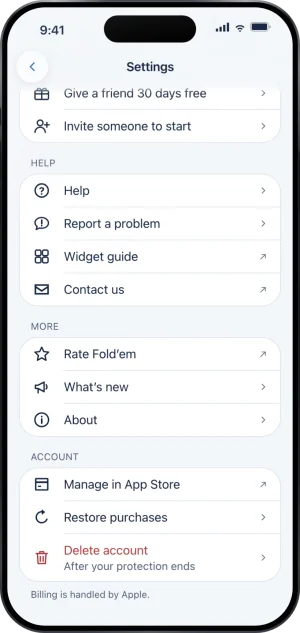
Settings, with Account at the foot
-
Read what the screen says about your protection
It checks with the server before it offers anything, and it will say plainly that it cannot confirm your status rather than guess if that check fails. Nothing about your account or your protection changes because you opened this screen.
-
Schedule it, or finish it
While protection is running the button reads Schedule deletion. Once nothing is in the way, the screen shows what will be removed and a slider reading Slide to delete your account, then Sign in with Apple confirms. When it is done the app tells you your account is deleted and wipes what was on the phone.
What this does not do
Deleting the account is not a way out of protection and cannot be used as one; that is the whole reason the gate exists. Deleting the app is not this at all: it removes nothing from the server, ends no protection, and if the deletion delay is on it will not remove the app either. Deletion does not cancel your subscription, which lives with Apple and has to be cancelled there. It cannot be reversed once it has actually run, and support cannot restore an account that has finished deleting. If your records are in a state the server refuses to act on, the screen says so and points at support rather than pretending to schedule something that will never complete.
Write to us and a person reads it. We answer within two working days, and we would rather hear the question twice than not at all.