

The full answer
It carries the gambling free count, a daily check in that nobody else sees, the money you have kept, and a card for whatever is currently running, such as a request to end protection, a Lockdown run or a payment that did not go through. Nothing on Today ends anything and no number on it decides anything: every deadline that could end your protection is held on the server, and the phone reads it.
Today reports, and that is the whole of its job
Today is the first of four tabs. Lock holds the blocking layers and Lockdown, People holds your circle and the people you support, Settings holds everything else, and Today is the one that answers the question you actually open the app with: how long has it been.
It is deliberately not a control panel. Nothing on Today itself ends your protection or changes what is blocked; when a request is ready, its card opens the page where Keep protection and the hold to end protection live. Every deadline that could end your protection is a stamp held on Fold’em’s server, and what Today draws is a reading of that stamp. The two waits that run out on the phone's own clock, the Games layer's and a Lockdown run's, end at their own time whether or not Today is open, and who ends protection names the waits the phone runs.
What it carries
The gambling free count. Days, hours and minutes since your last bet, under the word Gambling free, with an arc over it drawing how far along your goal you are. It is yours rather than the block's, so it keeps running through everything that happens to your protection. Behind it, the people in your circle walk the same path, with your goal on a signpost ahead of them.
A check in. One question, How are you today?, and four answers. It is private: no supporter and no keyholder ever sees an answer, and the History behind it is yours alone.
Money kept. Your own weekly stake applied to the days you have held, drawn against the goal you chose.
A card for whatever is running. A request to end protection or a key handover in progress, a Lockdown run with the time it ends, a payment that did not go through, Screen Time turned off. The card names the thing and where it has got to, and it does not invent a state of its own. When protection is off, the card reads Protection ended with Start protection again under it, the check in is gone until protection is back, and the count above it keeps counting.
Every part of it is a door
-
The count opens your goal
Tapping the count opens Your goal: the days left to your goal in large type, the date of your last bet and your goal date. Tapping the money card opens Money kept. Neither page changes what is blocked; both are the same numbers with more room.
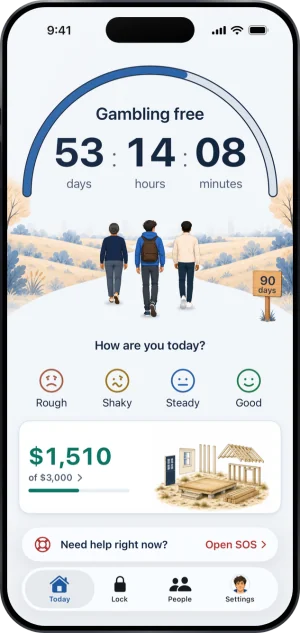
Today, on an ordinary morning
-
A card names what needs you
It sits under the count, and the whole card is the door. A payment card opens Resolve payment in Settings, a Lockdown card opens the Lock tab, a layer that needs attention opens that layer on the Lock tab, and a request to end protection opens its own page, where Keep protection is the filled button.
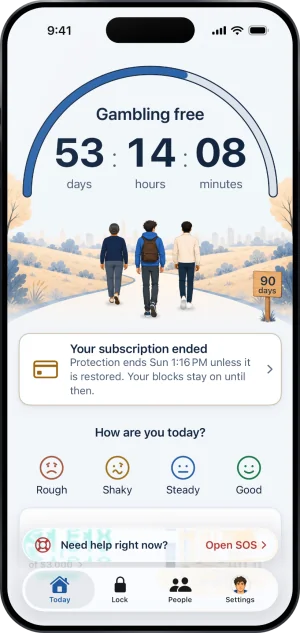
A card under the count
-
The bar at the foot opens SOS
Need help right now? sits above the tab bar at the top level of every tab, and Open SOS opens it. Settings is a tab of its own, the last one, with your character as its icon.
What this does not do
The layers and their sheets are on the Lock tab, not here. Ending your protection lives with the server, and the phone re applies what it is told; a Lockdown run ends on the phone at the time it was set for, whether or not Today is open. With no connection, a line at the top reads Offline. Showing what was saved. and Today draws the saved state rather than guessing. And nothing on Today is evidence about a second phone, a desktop or a betting shop.
Write to us and a person reads it. We answer within two working days, and we would rather hear the question twice than not at all.