

You relapsed tonight. What to do before you sleep
Put the phone down, tell one person, and nothing else has to be finished tonight.
Need someone now?
These lines are free and not run by Fold’em.
- Call 1 800 697 3738National Problem Gambling Helpline, US. Call, text or chat.
- Call 1 866 531 2600ConnexOntario, Canada. For people in Ontario.
- Call 0800 1 37 27 00BZgA Check dein Spiel, Germany
- Call 1800 858 858Gambling Help Online, Australia
- Call 0808 8020 133National Gambling Helpline, UK
- Other countries
Updated October 2026
If you want to talk to somebody now
These lines are free, they run at this hour, and none of them is us. You do not have to have a plan before you call, and you will not be asked to install anything.
- United States. The National Council on Problem Gambling runs the National Problem Gambling Helpline, printed on its own pages as 1-800-MY-RESET, with call, text and chat. Its Help by State directory connects you with local support and resources across all 50 states, in its own words.
- United Kingdom. The National Gambling Helpline, run by GamCare, on 0808 8020 133. The NHS page on gambling states that it is free, 24 hours a day, 7 days a week, for information, support and counselling.
If Fold’em is already on the phone, SOS is the screen for this, and it opens from the foot of every tab, from the widget pad and from the block screen. Nothing on it can loosen your protection. SOS has a helpline too: Talk to someone opens your people and a gambling helpline. The free ones at the foot of this page answer whether or not you install anything.
There is a widget for it too, a small home screen pad whose whole face is one tap to SOS. It never shows a day count or anybody's name, and it comes with the word SOS on it or as the mark alone, so what sits on your home screen stays your decision.
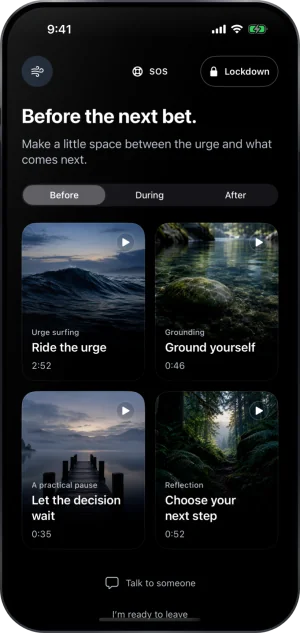
SOS, which asks nothing of you
Nothing about tonight has to be decided tonight
Two things before any advice. A relapse is not proof about the kind of person you are, and it is not rare: in one study of 101 people who had just quit gambling, only 8 percent stayed entirely free of it for the next twelve months. And the hour you are reading this in is the worst hour for any large decision, including the decision that it is hopeless.
So the list below is deliberately small, none of it is treatment, and there is nothing on it you cannot do again tomorrow.
Close the session, and leave the numbers alone
Stop playing, put the phone down for ten minutes before you decide anything else, and then do not open the balance, the bet history or the banking app. Counting the damage at this hour can start the next session, because a figure large enough to frighten you is also a figure large enough to feel like something you have to win back. It will still be there in the morning, when you will be somebody who can look at it.
If you can, put the phone in another room while you find the number you are going to call.
Tell one person
One is enough, and it does not have to be the person it would be hardest to tell. Saying it out loud once tonight moves it from something you are managing alone to something that exists outside your head. A helpline counts as the one person if there is nobody else at this hour.
If you decide later to seal the phone, that same person is who a keyholder is: somebody who holds one answer, sees a status and never sees what you browsed or what anything cost. The page written for them says exactly what they would and would not be shown, which can be what makes the ask possible.
Three things worth changing on the phone
Do these in order, and stop whenever you have had enough. Any one makes tomorrow slower than tonight was.
-
Block the apps rather than deleting them
Deleting is the reflex and it buys fifteen seconds, because the App Store puts it back. A Screen Time shield covers the app instead: it stays on the phone and refuses to open. How the app seal works.
-
Deal with the websites, not only the apps
An app you cannot open is a website you can. An encrypted DNS setting answers the betting addresses with 0.0.0.0, the address for nowhere, so the pages fail to load in every browser on the phone, browsers inside other apps included. The phone version of all of this goes through it.
-
Put the undo behind somebody
A block only you can lift is the easiest one to lift on a bad night. Naming a keyholder means ending it takes a request and a wait rather than a thumb. How the invite works.
Why the quick methods do not survive the next bad hour
You may have tried some of these already. They are not useless, and they fail the same way: the person who set it is the person who can unset it, in the same Settings app, in seconds.
- Deleting the app. Reinstalling is a search and a tap, and nothing about the account, the balance or the saved card goes anywhere.
- Turning off app installs. Screen Time can restrict installing apps, which does make reinstalling harder. It is also a switch in the same Settings app, and it blocks every other install while it holds.
- A time limit on the app. A limit you set for yourself is one you can extend for yourself, and willpower at the limit screen is exactly what you were trying not to depend on.
- Giving somebody the Screen Time passcode. Better, and still not what it looks like. Apple's own page on a forgotten Screen Time passcode says to open Settings, tap Screen Time, tap Change Screen Time Passcode twice, and, if asked, enter the Apple Account email address and password that you used to set up the Screen Time passcode. If that account is yours, the reset is yours too.
- A filtering DNS profile. Strong while installed, and removable by you in Settings in about the time it took to add.
None of that argues for doing nothing. It argues for reading which failure belongs to the tool and which to the arrangement around it, which is the whole of the next page.
In the morning
Two things, when you are somebody who can do them. Look at the money once, with another person if that is possible, and decide what the next payment is rather than what the total means. And if you want the phone different by tomorrow night, the order that holds starts with a register rather than an app, because a register reaches accounts a phone never touches.
Then the urge itself, which has its own page. What is worth knowing tonight is only that urges are episodes rather than a state, and that the waits in this product exist because a decision made inside one can look different the next morning.
The help center answers how the app behaves, screen by screen. If your question is not there, write to us. A person reads it and answers within two working days.
If you need someone now
Free, and not run by Fold’em.
- Call 1 800 697 3738National Problem Gambling Helpline, US. Call, text or chat.
- Call 1 866 531 2600ConnexOntario, Canada. For people in Ontario.Website for ConnexOntario
- Call 0800 1 37 27 00BZgA Check dein Spiel, GermanyWebsite for BZgA Check dein Spiel
- Call 1800 858 858Gambling Help Online, AustraliaWebsite for Gambling Help Online
- Call 0808 8020 133National Gambling Helpline, UKWebsite for the National Gambling Helpline
- Other countries
Gam-Anon is a community for people supporting someone who gambles.