

Can I block gambling apps on their iPhone
Not from your phone, but they can block their own and name you, so ending it has to come through you.
Updated October 2026
Who installs it, and where the permission lives
The blocking on an iPhone is done by Apple's Screen Time controls. An app asks for permission to use them, the person signed in to that phone grants it, and from then on the app can seal the apps that person picked. Every part of that happens on the one device. There is no remote grant, no administrator account and no way to hand the permission to somebody who is not holding the phone.
So the person who wants to be blocked installs it and picks what to seal. You cannot do that step for them, and any product that says otherwise is describing a company owned device or a parent managing a child's account, which is set out further down.
Nor is there a way to remove the permission afterwards. Screen Time can be switched off in Settings by whoever holds the phone, and no app on iOS can stop that. What Fold’em does about it is refuse to pretend: switching it off is not blocked, and if you hold their key, your card for them shows it.
What you hold instead
Requests. When they ask to end protection or to end a Lockdown sooner, the request reaches you and you answer it.
Saying no is one tap, from anywhere, in your own app, and your phone confirms it is you before the tap counts. Letting them out is only ever done face to face: your app shows an approval code and they scan it with the app on their phone while you stand together, and no web page and no email can do it. Even then a wait of 48 hours starts from the moment you said yes.
You cannot start their protection, end it, or shorten or cancel a wait. You can choose which kinds of alert ring your phone, in your own Settings, and a request to end protection always reaches you whatever those switches say.
Exactly what you are told
Their protection shows on a card in Fold’em on your own phone, and the card changes when one of three things happens.
- Protection went off. Screen Time permission was switched off on that phone, or the shield Fold’em applied is gone. Your card changes to Protection off. It can be a hard moment, or simply Screen Time being reset for another reason.
- The phone stopped confirming. No reading of any kind has arrived for 24 hours. Your card reads Not confirmed yet, which is the gentler of the two: it can be as ordinary as a dead battery or airplane mode, and it does not say anything was switched off.
- Protection is ending. Your card reads Protection at risk, and you are told it ends in 72 hours unless it is restored.
Beside those there are requests: to end protection and to end a Lockdown sooner. You answer them rather than simply read them, and they always reach you. Which kinds of alert also ring your phone is yours to set in your own Settings.
The web setting
Fold’em blocks betting sites with an encrypted DNS setting on the phone, separate from the Screen Time seal that holds the apps. That setting can be switched off in iOS Settings.
Reading the card
The card you hold for them in your app carries one status at a time, and it is the fastest honest summary you have.
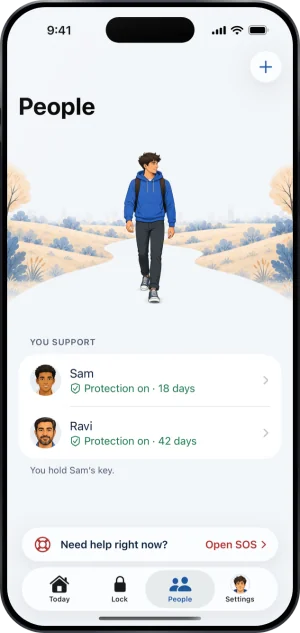
The cards you hold, in your own app
Protection on, with a green shield, means the last reading said the permission is granted and the shield is applied. The three above are Protection off, Not confirmed yet and Protection at risk. There are quieter states too: Not confirmed yet while the app picks are redone after a reinstall or an iOS update, and Protection ended once protection has ended.
Two cautions. A calm card is not proof that the moment is calm: a card can be behind, and the People tab says when it last synced. And no word on it describes a person. They describe one phone's protection, and gambling somewhere that phone cannot reach does not turn a card. The help page on what each state means is the fuller account.
What you are shown, and what is never sent
A keyholder is shown eleven things, and that list is written out in full on two help pages and in the privacy policy; every other page points at it. Read it before you accept: what a keyholder can see, or the same list from the other side at what my keyholder sees.
The shape of it is status, counts, dates and event kinds. App and site names, browsing and amounts of money are not merely hidden; no channel carries them to a supporter at all, which is stronger than a promise not to display them. The one thing they type that can reach you is a note they add when they ask you, as their keyholder, to end a Lockdown sooner.
What Family Sharing is, and is not, for
If the phone belongs to a child in your family, the answer is Apple's rather than ours. Apple's support page on Family Sharing states that it lets a parent or guardian manage a child's device with Screen Time and parental controls, and that where it is legally required an Apple Account for a child under 18 has to be part of a Family Sharing group. Once the child's account is in the group you turn on Content and Privacy Restrictions, which governs the apps and content they can reach, as Apple's page on parental controls sets out.
Family Sharing is not a route to an adult's phone. An adult in a family group manages their own Screen Time, and the group gives nobody else the ability to seal their apps. The page for parents covers both cases.
The help center answers how the app behaves, screen by screen. If your question is not there, write to us. A person reads it and answers within two working days.
If you need someone now
Free, and not run by Fold’em.
- Call 1 800 697 3738National Problem Gambling Helpline, US. Call, text or chat.
- Call 1 866 531 2600ConnexOntario, Canada. For people in Ontario.Website for ConnexOntario
- Call 0800 1 37 27 00BZgA Check dein Spiel, GermanyWebsite for BZgA Check dein Spiel
- Call 1800 858 858Gambling Help Online, AustraliaWebsite for Gambling Help Online
- Call 0808 8020 133National Gambling Helpline, UKWebsite for the National Gambling Helpline
- Other countries
Gam-Anon is a community for people supporting someone who gambles.