

My partner keeps gambling on their phone
A block they chose, with you named on it, is the one that cannot be switched off in private.
Updated October 2026
Why it has to be their choice
You may have come here wanting a setting you can turn on. It is worth understanding why there is not one, because the reason also tells you what does work.
An app blocker on an iPhone runs on Apple's Screen Time controls, and an app can only use those controls on the phone it is installed on, with permission granted by the person signed in to that phone. There is no remote switch. If you set something up on their phone while they were out of the room, they could undo it in Settings in under a minute, and they would know you had done it. You would have spent your credibility and bought nothing.
What holds is different in kind. They seal the phone themselves, with no end date on it, and they name you as the person who has to be asked before it can end. The block is then not a wall between you but an agreement, and your part in it is small and defined.
The conversation, and what not to make it about
Two things can sink this conversation, and both are avoidable.
The first is opening with the money. Money is the evidence, so it is where you want to start, and it is also the thing that can turn the next twenty minutes into an argument about a number. The phone is a smaller ask and a more concrete one.
The second is asking them to promise. A promise puts the whole weight on the worst version of a future evening. Asking for an arrangement moves the decision to now, while things are calm, which is the entire idea behind a commitment device and the only thing this kind of tool is good at.
What lands is narrow. You are not asking them to be different. You are asking them to make the next bad night take a phone call rather than a thumb. The wording, and the moment they ask for the key back, has its own page, because the second half is the part that is easiest not to prepare for.
Consent, in the plainest terms
They install it. They choose which apps and sites to seal. They invite you. You accept, in Fold’em on your own iPhone. At no point does anything you do reach into their phone, and at no point does anything they do give you a view of what they are doing on it.
That is not a limitation to apologise for. If this tool reported their browsing to you, no adult would agree to it, and the arrangement you want depends on them agreeing.
What accepting actually involves
They invite you with a link, a code you type, or a code you scan when you are together, and you accept in Fold’em on your own iPhone, signed in to your own account. If you do not have the app yet, the link opens a short page saying who asked and that a supporter account costs nothing, then takes you to the App Store; after you sign in you open the link again or type their code. Before you accept, the app shows you what a keyholder is shown and what is never sent at all, and declining is a supported answer rather than an awkward silence.
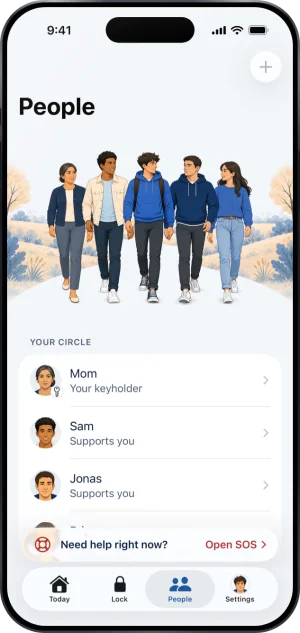
Where a keyholder sits in People
From then on their protection shows on the card you hold for them. Which kinds of alert also ring your phone is yours to set in your own Settings; a request to end protection always reaches you whatever those switches say.
You can hand the key back later, from your own app, except while a request of theirs to end protection is open or a handover is in flight. It is better than holding a key and not reading it. It takes effect at once: their protection continues with nobody holding the key, and from that moment ending protection takes seven days from the request rather than a decision from anybody.
The first week
The week after setup is quiet, and the quiet can be the unsettling part.
What the first week looks like
-
Day one, your card goes green and stays there
Their card in your app shows a green shield, and the count of days they have been gambling free if they share it. Nothing is asked of you, and when nothing goes wrong there is very little else to read.
-
You will want to check the card. That is normal, and it is not evidence
A calm card means the blocks on one iPhone are running. It is not a statement about a person, and it cannot tell you whether anybody gambled somewhere else. Reading it as a verdict is the fastest way to turn an agreement into surveillance.
-
If the card turns, read which word it turned to
Protection off means Screen Time was switched off or the shield is gone. Not confirmed yet means the phone has sent no reading for 24 hours, which can be as ordinary as a dead battery or airplane mode. Protection at risk means protection is ending. None of the three is the same news.
-
If a request arrives, you have seven days and one tap
Saying no is one tap in your app, and your phone confirms it is you first. Letting them out cannot be done at a distance at all. Seven days of silence closes the request, so not answering is a decision too.
When the request comes
It may, and it does not mean the arrangement failed. It means the arrangement is working: the thing that used to take a thumb now takes a conversation with you.
Saying no is the easy choice by design. It is one tap, from anywhere, and if you say no they are told, with no reason attached, and the request closes there. A denial is a denial. They can ask again 48 hours later, and that opens a new request rather than reviving this one. You are not required to explain yourself and there is no field for a message in either direction.
Letting them out is deliberately harder, and it is the one part of this you cannot do at a distance. Your app shows an approval code and they scan it with the app on their own phone, while the two of you are standing together; no web page and no email can do it. Even then nothing opens that day: a wait of 48 hours starts from the moment you said yes, and at the end of it the server marks a release they still have to take.
If you answer nothing, the request closes after seven days and their protection carries on unchanged. Silence is not neutral and it is not a yes: it is a week in which they are told nothing and nothing moves.
What this is not
It is not treatment, and it is not advice about your relationship. It is one iPhone, sealed until they end it, with you named as the person who has to be asked. A second phone, a laptop, a betting shop and cash are all outside it.
It is also not your responsibility if they gamble anyway. The role has one power, it covers the blocks on one phone, and nothing you are shown would tell you whether somebody gambled. If it is getting heavy, the organisations on the main page for people beside someone who gambles exist for you rather than for them.
The help center answers how the app behaves, screen by screen. If your question is not there, write to us. A person reads it and answers within two working days.
If you need someone now
Free, and not run by Fold’em.
- Call 1 800 697 3738National Problem Gambling Helpline, US. Call, text or chat.
- Call 1 866 531 2600ConnexOntario, Canada. For people in Ontario.Website for ConnexOntario
- Call 0800 1 37 27 00BZgA Check dein Spiel, GermanyWebsite for BZgA Check dein Spiel
- Call 1800 858 858Gambling Help Online, AustraliaWebsite for Gambling Help Online
- Call 0808 8020 133National Gambling Helpline, UKWebsite for the National Gambling Helpline
- Other countries
Gam-Anon is a community for people supporting someone who gambles.