The pass will not update
Updated September 2026
The pass in Wallet is a copy, and Fold'em cannot reach into it: when something changes, the server asks Wallet to come and fetch a fresh pass, and Wallet does the fetching. So a card that looks stale means one of two things. Either the fetch has not happened, which is what the Refreshed row on the back of the card is for, or it did happen and nothing on the card was meant to announce itself. Email is the channel that is guaranteed to arrive; the pass is the fast one.
How the card actually updates
A Wallet pass is not a live view. It is a signed file that Wallet holds, and Fold'em has no way to edit the copy on someone's phone. What the server can do is send Wallet a contentless nudge that says come and get the new one, and Wallet then downloads a freshly generated pass from Fold'em's pass service. Everything on the card is baked at that moment.
Two things follow from that. The card can only be as fresh as its last fetch, which is why the back of every card carries a Refreshed row saying when the copy in front of you was generated. And the nudge can only reach a device that registered for the pass, which happens when the pass is added to Wallet. A keyholder who read the email but never added the pass has nothing registered, so no nudge reaches them and the card they never added is not the thing to check.
A card can update without a banner
The lock screen banner is a separate mechanism from the update. A field fires a banner only when its value genuinely changes, and several fields on the card deliberately carry none: the day count and the blocked attempt count move on every single generation, so a banner on them would fire on every fetch and mean nothing within a week. The status word, an exit request appearing, a keyholder change and a milestone are the moments that do carry one.
So a card that looks the same after a quiet week is usually a card that is completely up to date. Read the Refreshed row rather than waiting for a banner.
The web view is the live one
Every letter Fold'em sends a keyholder carries an Open the web view link, and that page is not a copy: it reads the current state each time it is opened. When the card and the web view disagree, the web view is right and the card has not fetched yet. That link is also the honest thing to send someone who is asking whether something has changed, because it cannot be stale.
A card showing the wrong person
A card that names someone who is no longer a keyholder is doing what it was built to do for a few days. When a keyholder is removed or hands the key on, their old card keeps answering for seven days and then stops, so nobody is left holding a card that silently means nothing. If it still names them after that, it is a card that has not fetched.
If the card is genuinely stuck
-
Read the back of the card
Turn the card over. Refreshed says when this copy was made, and Questions opens this help center. If Refreshed is recent, the card is current and there was simply nothing to announce.
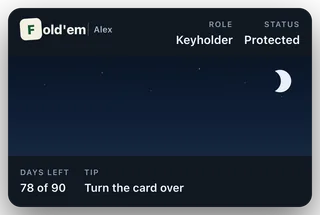
The pass, front
-
Open the web view from any Fold'em email
The link reads live, so it settles the question immediately without waiting on a fetch. A keyholder who has lost the email has lost the link with it, and the next step is the answer.
-
Send them a fresh key
Open Circle, tap your keyholder, then Resend keyholder access. Fold'em emails them a fresh key and their old pass stops working, so the stale card cannot go on answering beside the new one. It cannot be repeated inside an hour and cannot run more than three times in a day, because every one of them really does kill the live pass.
What this does not do
The pass is not a control. Nothing on it approves an exit, cancels a wait, or changes what is blocked, and no tap on the card reaches your phone. A card that is out of date has no effect on the block itself: the shields are held from your phone and the server, not from Wallet, so a stale card is a stale reading and never a weaker lock. Fold'em also cannot promise a delivery time for a pass update, because Apple does not: that is exactly why every consequential moment goes out by email as well, and why the email is the one that is guaranteed to arrive.
Still stuck? Email support@foldem.app and we answer within two working days.