My keyholder lost their pass. What now?
Updated September 2026
Open their page in the Circle and use Resend keyholder access. The server mints them a fresh pass and a fresh web link, emails both to the address they gave when they accepted, and rotates the old credentials so the card on the lost device stops working immediately. There is no field for a different address anywhere in that flow: a new address is treated as a different person, and moving the key to somebody else is a handover instead. If they never accepted in the first place, there is nothing to resend and you share the invite link again.
First, which thing was lost
Three different problems look the same from the outside and only one of them is the resend.
They never accepted. An invite that is still waiting has no pass and no dashboard behind it, so there is nothing to reissue. Open their page and share the same link again; if it has less than a day of life left the server signs a fresh one in the background, and the copy you sent before stays usable until its own expiry. If the invite has already closed, cancel it and send a new one.
They accepted and cannot find the email. Every Fold'em email comes from hello@foldem.app. It is worth checking spam and trash, and on Gmail the Promotions tab, before reissuing anything: a resend kills the pass they already have, so a found email is the cheaper answer.
They accepted and the device is gone. This is the case the resend exists for, and it is the case where killing the old card is the point rather than the cost.
What the resend actually does
It rotates two credentials, because a keyholder holds two and they live in different places. One is the token in the emailed web link, which is what an open browser session is holding. The other is the bearer baked into the installed Wallet card, a different string in a different store. Until both move, a card sitting on a lost phone keeps pulling your live status however many times you resend.
After the rotation, every later pull from the old card is refused and the lost device stops listing the card at all. The new card carries the same serial, so when they add it, it replaces the old one in their Wallet rather than joining it.
The rotation also opens a 24 hour window in which their new device may enrol a Face ID credential on a link that already has one. That window is opened only by this action, which is yours and is authenticated, so a leaked link can never enrol a credential for itself.
Why there is no address field
The callable takes no address argument at all. It reads the address on the link and sends there. That is what stops a lost link from becoming somebody else's key: an attacker who has the link cannot ask for the pass to be sent anywhere new, and neither can support, because the path does not exist. If your keyholder genuinely needs to move to a new address, that is a change of keyholder and runs through a handover with its own consent from both sides.
The brake
The server allows one resend an hour and at most three in any 24 hours, counted per keyholder. It is the only protection against locking your own keyholder out by resending repeatedly, since each call really does kill the card they are holding. Past either limit the call is refused and the screen says so rather than pretending it sent.
Doing it
-
Circle, then their page, then Resend keyholder access
The screen names them, says what the resend is for, and states the two consequences before you press anything: they are emailed a fresh key, and their old pass stops working. Confirming sends it, and the confirmation asks you to tell them to check their email and add the new pass. What lands is the same card they had, with a live credential behind it.
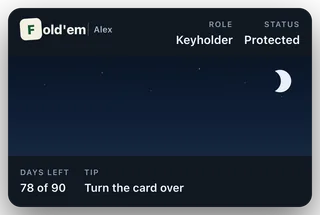
The card they get back
Their alerts keep working meanwhile
The guaranteed email alerts read the address on the link rather than either credential, so an early exit request, protection turning off, a quiet phone or a lapse still reaches them during and after a rotation. Losing a pass never leaves the safety floor down.
What this does not do
It does not send anything to a new address, and no support request can. It does not work before somebody has accepted, and it does not work for a witness: the call resolves your active keyholder and refuses when there is none, and Fold'em has no witness resend at all. It does not change your term, your shields or any wait that is running, and it does not tell your keyholder anything about you that they could not already see.
Still stuck? Email support@foldem.app and we answer within two working days.