Can I cancel an exit request?
Updated September 2026
Yes, and at every stage: while your keyholder is deciding, while the wait counts down, and after the release is ready but not taken. The control is called Cancel the exit, it confirms through one centred alert, and keeping the exit is the easy default on that alert. Nothing about the block changes when you cancel, because nothing about the block changed when you asked: your term simply carries on to the end you chose. Only you can do it, and the one moment it is no longer offered is after you have taken the release, because by then the term is over.
Three stages, one control
An exit passes through three states you can cancel from, and the same control appears in all three. While the request is waiting on your keyholder, cancelling means they are never asked at all. While the wait is counting, cancelling stops the count. Once the wait has finished and the release is ready but not taken, cancelling gives the release up.
That last one used to be impossible and is deliberately possible now. A release that is ready is not an unlock in flight: it is an offer, standing on a phone whose shields are all still applied, so turning it down is an ordinary cancellation rather than a race against the server.
The control is spelled Cancel the exit everywhere it appears, on the process sheet and on Home's card, because one act with two names is how two surfaces come to disagree. On Home, while a keyholder is still deciding, the same act is offered on the card as Cancel the request and raises the same alert.
The alert, and why keeping is the easy answer
Cancelling confirms through a centred alert rather than happening on the tap. That is the one place the product's usual rule is inverted on purpose: leaving is made deliberately hard everywhere else, but here the destructive direction is leaving the exit running, so the confirmation exists to protect the pro recovery choice. Keeping takes the easy role on the alert, which is the one a stray tap or the escape gesture lands on.
The alert's title is always Cancel the exit?. What changes is the sentence under it and the label on the keep button, both of which name what you are keeping at this exact stage. While a named keyholder is deciding, it says they will not be asked. While the count is running, it says the countdown stops and your protection keeps running to the end of the term. With a release ready, it says the release goes away and your protection keeps running to the end of the term. The keep button reads Keep waiting, Keep the countdown or Keep the release to match.
Cancelling, step by step
-
Open the exit from anywhere it shows
The What happens next card on Home, the running row on the Circle root, and your keyholder's page in Circle all open the same sheet. Home's card also carries the cancel directly while a keyholder is deciding, so it can be reached without opening the sheet at all.
-
Take Cancel the exit at the foot
It is the outlined control at the bottom of the sheet, in the destructive style, and it sits under the go forward action rather than beside it. Tapping it raises the alert and nothing else.
-
Confirm, and watch nothing move
The alert names what you are keeping and offers the two answers. Confirm and the request closes; the safe on Home goes back to reading PROTECTED, the apps stay sealed exactly as they were, and your day count and the money you kept are untouched. There was never a moment when the block was softer.
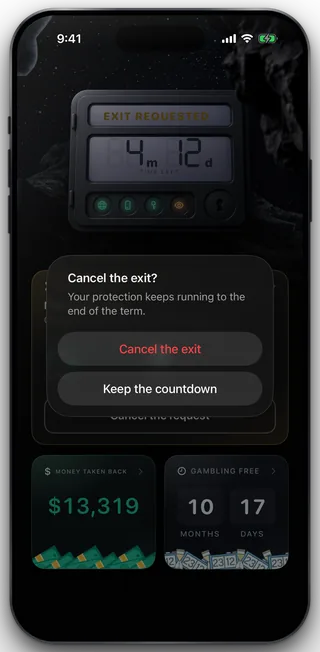
The confirmation, over the wall
If you are offline
Cancelling is built to fail toward more protection, not less. Once a wait is counting or a release is ready, the phone locks itself back down the instant you confirm, without waiting for the network, and the message to the server is kept and sent again on the next launch or the next time you open the app. If the message never lands, the shields are already up, so nothing was promised that did not happen.
While the request is only waiting on a keyholder, nothing local has changed yet and the keyholder can still answer, so the app tells you the truth instead of pretending: the exit stays as it is for now and the cancellation finishes the moment you are back online. If a cancellation fails while you are online, the sentence is that it did not go through and nothing changed.
What this does not do
Cancelling does not shorten or extend your term, does not change what is blocked, and does not undo an approval your keyholder already gave: if you ask again later, that is a new request and the wait starts over. It does not hide anything either. Your keyholder sees that a request was open and sees that you withdrew it. Nobody else can do it for you, including your keyholder and including support, because the rules on the server allow only the owner of a request to touch it. And there is one moment when it is no longer offered: after you have taken the release, the term has ended and there is nothing left to cancel.
Still stuck? Email support@foldem.app and we answer within two working days.