Why do the apps not open by themselves?
Updated September 2026
Because the last step is a choice, not a clock. When the wait ends, the server marks a release as available and stops there: your phone keeps every shield applied and shows you that the release exists. The apps open when you take it, through a control that confirms first, and taking it is what ends the term. If you never take it, the release closes after seven days and your protection simply carries on.
The end of the wait is an offer
A finished wait is not an unlock. When the cooling ends, the server changes your request to a release that is available, and that is the whole of what it does. It does not remove a shield, it does not tell the phone to remove one, and the phone does not remove one on its own. Every app you sealed is still sealed while the release sits there, every site is still blocked, and the deletion lock is still whatever you set it to.
The reason is the one the whole product runs on: ending a term should cost a deliberate act by the person who committed to it. A term that expires quietly, or an exit that completes while you are asleep, would end the thing you asked for without you being present for it. So the release is drawn as an offer with a control on it, and the term ends at the moment you take it.
The offer is held for seven days. That is one of two different sevens in an exit: seven days for a keyholder to answer a request, and seven days for a release to wait for you once it exists. If the seven days run out, the server closes the release, the request ends there, and your protection continues to the end of your term as though you had never asked. Losing an untaken release costs you nothing but the asking.
Taking it, and what taking it does
The control is Open the apps, and it appears in exactly two places: the ready position on the exit sheet, and the What happens next card on Home. On Home it is deliberately the quieter of the two controls on that card, because the card also offers Extend the term, and the product puts the weight on staying.
It confirms first. The alert asks Open the apps? and says plainly that blocking stops the moment you do, that this term ends here, and that nothing about it is undone. Keeping is the easy answer on that alert and reads Keep them closed.
Confirming sends one message to the server. The server ends the term, records the release, and the shields come off because the server said so, not because the phone decided the moment had come. Your history is not undone by any of it: the days you held and the money you kept stay on the record. If the message cannot get through, the app says so and your apps stay blocked; if the release has already expired, it says that instead, and your protection continues. Every one of those sentences leaves the phone shielded, which is the direction this path fails in by design.
What the ready state looks like
-
The rail's last step becomes the live one
The request and the approval are both stamped and done, the connector between them is full, and the numerals are gone: the server has said the wait is over, so nothing recomputes a fraction from the phone's clock. The third step, Apps open, is where the process now stands.
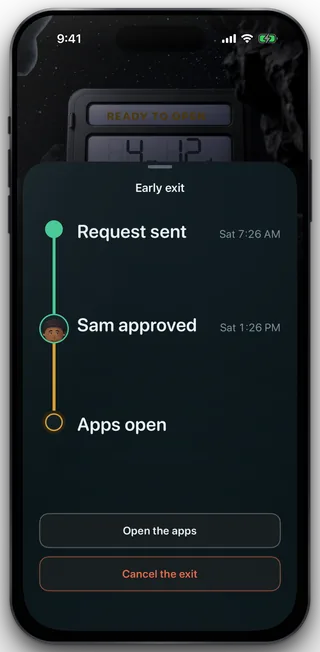
The sheet, with the release ready
-
Home says READY TO OPEN, and offers more time first
The safe reads READY TO OPEN with the key seated in its lock, and the card under it says your exit is ready. Where the term can still be lengthened, its white control is Extend the term and Open the apps is the quiet one beneath; on a term that cannot be extended the card carries the quiet one alone rather than offering a control the server would refuse.
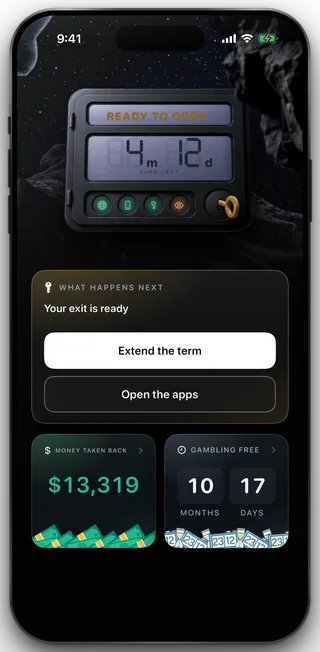
Home, with the release ready
-
The confirmation states the consequence
Open the apps? Blocking stops the moment you do, and this term ends here. Nothing about it is undone. Open is the destructive answer, Keep them closed is the easy one, and taking no action at all leaves the release standing for the rest of its seven days.
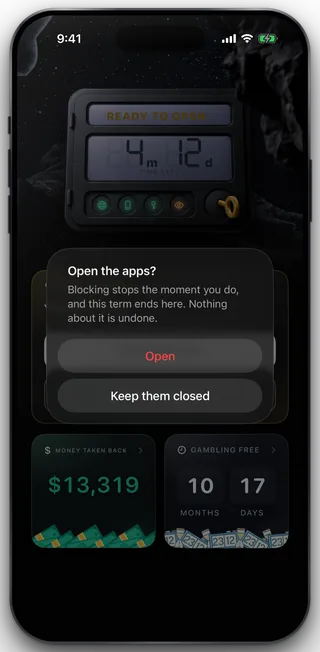
The take confirmation
The one thing that still releases on its own
A lapsed subscription is the exception, and it is the only one. If payment stops, the term ends because the service ended rather than because you chose it or the clock ran out, so the protection comes off on its own when the lapse window closes, 72 hours after the entitlement ends, without asking you to take anything. Everything else that ends a term waits for a tap: an approved exit, a solo exit, and a term that reaches its own end date.
What this does not do
Taking a release does not delete your account, does not cancel your subscription, and does not clear the history of the term you served. It cannot be undone: once the apps are open, getting protected again means starting a new term. It also cannot be spent on a different term. A release is bound to the term it was earned under, so a wait banked against a term that has since been replaced is refused rather than spent, and the phone stays shielded. And no version of this control exists on any other device: taking the release is done in the app, on the phone that carries the block.
Still stuck? Email support@foldem.app and we answer within two working days.