

Does Screen Time block gambling on its own
It can, and whether it holds depends entirely on who can undo it.
Updated October 2026
What Screen Time actually is
Screen Time is the restriction system built into iOS. Family Controls is the name of the piece Apple lets an app ask for, and it is a narrow piece on purpose: an app granted it can seal chosen apps, seal a whole App Store category, filter website addresses inside Safari, and refuse app deletion device wide. It cannot see which apps you use, or for how long.
That distinction is the reason this page exists. Every serious blocker on iOS is standing on the same foundation you already own, so a comparison between Screen Time and a Family Controls app is not a comparison of two blocking technologies. It is a comparison of two arrangements around the same one.
What it does on its own, set up by you
Quite a lot, and it is worth doing tonight rather than waiting for a decision about software.
You can seal individual apps so they do not open. You can seal a whole category, which is the setting that catches an app installed next week rather than the ones you can name today. You can turn on Apple's website restrictions, which refuse a list of addresses inside Safari and show Apple's own restricted site page rather than anybody else's. And you can stop apps being deleted, which is what keeps a sealed app from being removed and reinstalled around the seal.
Three limits are structural rather than incidental. The website filter reaches Safari alone, so Chrome, Firefox, Edge and every browser living inside another app are open unless you seal each one as an app. A curated list is a list, and regional bookmakers and new addresses fall outside it. And none of it reaches anything off the handset.
The passcode, which is the part that actually decides it
Everything above is held by a four digit Screen Time passcode. If you set that passcode yourself, you can lift every restriction in about fifteen seconds.
One answer is to have somebody else type the passcode in and not tell you. Better than nothing, and not what it looks like. Apple's own page, titled If you forgot the Screen Time passcode for an iPhone or iPad and read on 3 September 2026, gives the recovery route in four steps: open Settings and tap Screen Time, tap Change Screen Time Passcode twice, and then If asked, enter the Apple Account email address and password that you used to set up the Screen Time passcode.
Read that carefully, because it decides the arrangement. If the Apple Account used to set up the passcode is yours, the reset is yours, it needs nothing from the person holding the number, and they never find out it happened. Handing somebody a passcode without handing over the Apple Account behind it is a gesture rather than a lock.
What an app on top of it adds, and what it does not
A Family Controls app does not block harder than Screen Time, because it is Screen Time. What it can change is three things around it, and only the third one is unusual.
- It can cover the browsers Safari's filter misses. Not by extending Apple's filter, which is not extensible, but by answering the address below the browser. Fold’em pairs the Screen Time seal with an encrypted DNS setting that points every lookup this phone makes at a resolver answering known gambling domains with 0.0.0.0, so the page fails to load in any browser, including the ones inside other apps.
- It can hold the picking on your behalf. You choose the apps in Apple's own picker and the picker hands over opaque tokens rather than names, so the app counts how many you sealed and never learns which they are.
- It can move the undo off the phone. This is the only structural difference, and it is the whole product. In Fold’em the record of your protection lives on the server. Protection has no end date, and ending it is a request the server keeps rather than a switch on the phone: with a keyholder it takes their agreement in person and then 48 hours, and if they say nothing for seven days the request closes rather than granting anything. Without a keyholder nobody decides and the wait is seven days from the request. So the cost is time, and with a keyholder it is also a conversation.
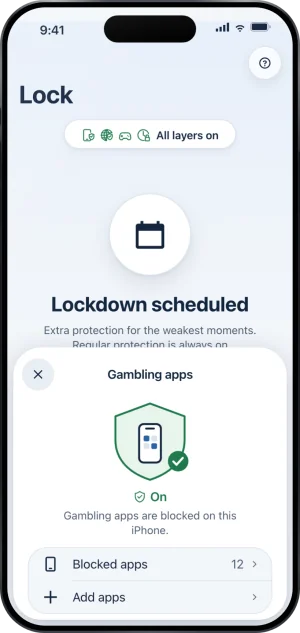
The count of sealed apps
What happens when Screen Time is switched off anyway
It can be. Screen Time permission belongs to you and can be withdrawn in iOS Settings, and no app on iOS can prevent that. Any product claiming otherwise is claiming a power the operating system does not hand out.
What a blocker can do is make it visible, and that is where a product built for self exclusion parts company with a focus timer. When the permission goes, the app shield stops holding, and if someone stands with you, their card for you shows Protection off; after 24 hours with no reading of any kind it reads Not confirmed yet rather than staying green. If nobody stands with you, nobody is told.
Three things do not move while the permission is gone. Your day count carries on, because it counts the days since your last gamble and only your own admission resets it. Ending protection runs on a server deadline, so switching Screen Time off starts no wait and shortens none. And the web shield was never running on Screen Time in the first place, so the addresses stay refused while the app seal is down. What happens if I turn Screen Time off is the fuller account.
So is Screen Time enough
It depends on one question, and it is not a question about Apple.
If the passcode is genuinely outside your reach, including the Apple Account behind it, then Screen Time alone is a strong app block with a Safari sized hole in the web half, and it costs nothing. That is a real answer and this page is not going to talk you out of it.
If the passcode is yours, or the Apple Account is yours, then what you have is a reminder with a numeric keypad in front of it, and the thing missing is not better blocking. It is a reason for the undo to cost something. That can be a person who holds the passcode and the account together, or it can be a record of your protection that is not on the phone at all. The mechanism table sets the classes side by side with what each one leaves open, and the pillar covers the layers in the order they hold.
One thing is worth doing whichever way that question falls, because it is free and it is wider than anything Screen Time can reach. If you have not registered with your country's self exclusion scheme, that is the move with the largest reach available to you, and it works on the accounts rather than on the handset. What a register does and does not reach says where its edge falls and why the two are meant to sit beside each other.
The help center answers how the app behaves, screen by screen. If your question is not there, write to us. A person reads it and answers within two working days.