What does my keyholder decide?
Updated September 2026
They keep the lock, or they approve in person. Keeping the lock is one tap on a page they reach from their pass or their email, and it is the easy choice on purpose. Approving is not something they can do from that page at all: the approval code lives on their Wallet pass, and it works only when you scan it with your own app while standing with them. If they answer nothing for seven days, the request approves itself as though you had no keyholder, and the wait after that is fourteen days rather than 72 hours.
Two decisions, and they are not symmetrical
When your request opens, your keyholder is told by email and by a banner on the Wallet pass they carry. Both lead to one page. The page opens behind a Face ID check against the passkey they set up when they accepted the key, so a forwarded link reaches a biometric wall rather than a decision.
On that page there are exactly two controls. Keep the lock is the confirm button, and it is the one that changes nothing: your term carries on as it was. Under it sits a small, quiet line saying that you are with them right now, which leads to an explanation rather than to an approval. The page states the point in one sentence of its own: letting you out cannot be done from there.
Approving is a physical act. The approval code is carried as a barcode on their Wallet pass, it is never printed on any web page, and it never reaches the copy of the request your own phone can read. You approve by opening the scanner in your app and scanning their pass while you are together. That is why the product calls it approving in person: there is no button anywhere that stands in for standing together.
Silence is the third outcome, and it is not their approval
Your keyholder has seven days to answer. Their page says so, with the date, taken from the same stamp the server enforces so the page and the rule cannot disagree. If that date passes with no answer, the request approves itself.
The important part is what happens next, because it is easy to get wrong. Silence is not the same as their approval. The server records the request as decided with nobody deciding it, exactly as if you had no keyholder at all, and the wait that follows is fourteen days. An approval given in person is 72 hours. Waiting out a keyholder who is not answering is the slower road, never the faster one.
What you see while they decide
-
The middle step names them and waits
The exit sheet carries three steps. The first is stamped with the time your request went out. The second carries your keyholder's name, their picture and the line saying you are waiting for them. The third states the rule you are waiting under: the apps open 72 hours after they approve.
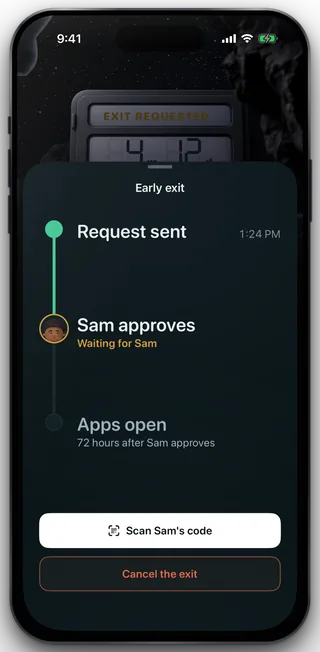
Waiting on the keyholder
-
Scan their code when you are together
The white control at the foot opens the scanner. It is the go forward action on this screen, and it is the only route to an approval. Nothing unlocks at this step: scanning records the approval and starts the wait.
-
Or call the whole thing off
The outlined control under it cancels the request. While the request is still open, cancelling it means your keyholder is never asked at all, and the page they were sent tells them you withdrew rather than showing them a decision to make.
What your keyholder cannot do
They cannot approve remotely. The only decision their page can write is a denial. There is no version of the link, the email or the pass that lets them end your term from somewhere else, and support has no such control either.
They cannot cancel or shorten the wait once it starts. The rules on the server allow only you to touch your own request, so an approval they gave cannot be taken back by them, and the 72 hours cannot be trimmed by anybody.
They cannot change what they are told. Which alerts go out is your setting, in your app. There is no toggle for them on any page or on the pass.
They cannot see what you are blocking. Not the apps, not the sites, not any amount of money, not anything you typed. The full list of what they see is eleven things and that is all of them.
What this does not do
A decision here does not extend or shorten your term, and it does not change what is blocked on your phone. A denial is not permanent and carries no reason: you can ask again after 48 hours. An approval is not an unlock either. It starts a wait, and at the end of that wait the release is something you take, not something that happens to you.
Still stuck? Email support@foldem.app and we answer within two working days.