What is the Wallet pass, and do I need it?
Updated September 2026
It is the main thing you hold: a card in Apple Wallet that updates itself, banners your lock screen when something turns, and carries the code an approval is scanned from. You do not strictly need it, because the same status lives on your web link and every consequential event also reaches you by email. What the pass adds is being told rather than having to look.
What the card is
You were emailed a pass when you accepted, and Add to Apple Wallet put it on your phone. It is a normal Wallet card, so it sits with your boarding passes and your loyalty cards, and it opens with no password.
The front carries the person's first name beside the mark, your Role, the Status word, and a facts row: how many days are left, and one signal or one process fact beside it. The sky behind it is the state, not decoration. A calm term is a starlit night with a moon; a phone that stopped confirming its blocks warms to amber; a finished term is first light.
The back carries what the front cannot fit: what is true right now and what it asks of you, then what your role is, then the alert state, the milestone row, the blocked attempt count, when the card was last refreshed, and a link to these pages. Turn the card over to read it.
How it updates, and why it can be late
The pass updates itself. When something changes on the server, a push tells Wallet to pull a new copy of the card, and a short line banners your lock screen so you learn about it without opening anything.
That push is best effort, not a guarantee. It can arrive late, or not at all, if the phone is offline, the network is slow, or Wallet has not synced in a while. This is why the guaranteed events are also emailed: an early exit request, protection going off, a phone that has gone quiet and a lapsed subscription all reach your inbox whatever the pass does.
Because a pass is a picture taken when it was generated, the back carries a Refreshed row with the date of that generation. It is the one question only the card can answer, and it is the row to read before trusting a calm face.
Do you need it
No, and the design says so deliberately. Everything the pass reports also exists in two other places.
Your status page is the same picture in a browser, at the link you were emailed. It has the status word, the day count, the end date and any open exit request, and it needs no app and no iPhone.
Email is the guaranteed floor. The four integrity events, a milestone day and the closing letter all arrive there for every keyholder, including one with no pass and no iPhone at all. The quieter updates are pass only and are simply absent without one, which is a deliberate scope decision rather than a fault.
One thing is easier with the pass: the approval code. When an exit request is open, the card carries a code on its front, and that code is what the person you hold for scans, in person, to end their term early. Without a pass they cannot scan anything from you, and the only remaining answer is to keep the lock or to let the seven days run.
Getting the most out of it
-
Read the front for the state
Role and Status sit together at the top right. Days left carries the count, as a countdown on a fixed term and as a plain count up on an ongoing one. On a calm card the second fact is a tip to turn the card over.
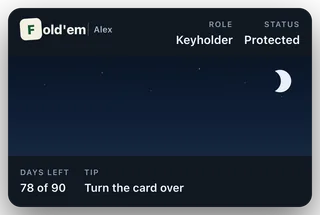
The pass at rest
-
Turn it over for what it asks of you
The first row on the back states what is true and what, if anything, it needs from you. Under it, What you hold names the role in one sentence: you approve or decline an early exit, and nothing else.
-
Leave lock screen banners on
The banner is how a turn reaches you without you going to look. It is one line and it never names an app, a site or an amount, because none of those are sent to a partner at all.
What this does not do
The pass is not a control surface. There is no button on it that changes anything about their phone, their term or their blocks, and there is no approve button anywhere in Fold'em. The two links on the card are the decision page, which can only keep the lock, and this guide.
It is also not a live feed. It shows what was true when it was last generated, which is why the Refreshed row exists, and a quiet card is not evidence that nothing has happened. If the pass sharing controls are greyed out, that is deliberate: the card is bound to you and is not meant to be forwarded.
Still stuck? Email support@foldem.app and we answer within two working days.