What does the Home screen show?
Updated September 2026
Home is a matte safe on a night wall, and the safe is the status display. It carries one word for the state of your protection, a readout carrying the number that matters, four lenses reading web, apps, keyholder and witness, and a keyhole showing whether a key is in the lock. Below it sits a short stack of at most five cards in fixed slots. Home reports and never decides: there is no exit affordance on it, no control over blocking, and no timer that gates either.
The four parts of the safe
The word is one line for the whole state of your protection, and it is chosen by a single ordering so two things can never claim the top of the screen at once. There are eight of them: Protected, when every layer you set up is running; Needs attention, when a layer is down; Exit requested, when you have asked to end early and someone is deciding; Opens on a date, when that was granted and cooling is running; Ready to open, when cooling is over; Term complete, when you served the whole term; Checking, when the server cannot be reached; and Open, when protection is off.
The readout beneath it carries two fields and a caption naming which number it is: TIME LEFT counting down to a fixed end date, or TIME HELD counting up. An unlit place still shows its ghost digit, so a leading zero reads as a place rather than a gap, and the whole readout dims when protection is off, because then the number is what you last held rather than what you are holding.
The four lenses read, left to right: web, apps, keyholder, witness. Green means that layer is holding. Orange means a seat is open, which is never a fault. Red, always with a broken glyph so the colour is never the only signal, means enforcement is down and one step brings it back. A dark lens appears only on the open door, when nothing is running.
The keyhole answers one question: whether a key is in the lock. It stays empty while a request is still being decided and seats only once an exit has been granted, which is what stops a pending exit and a granted one from looking alike.
Tapping the safe opens a sheet called What the safe is telling you, which names each of those four parts and lists every other value it could be showing.
Five of the faces
-
Resting
Protected, every lens lit, and the stack below is the ledger pair plus a setup tip you can hide from its own menu. Home scrolls, so the cards continue past the first screen.
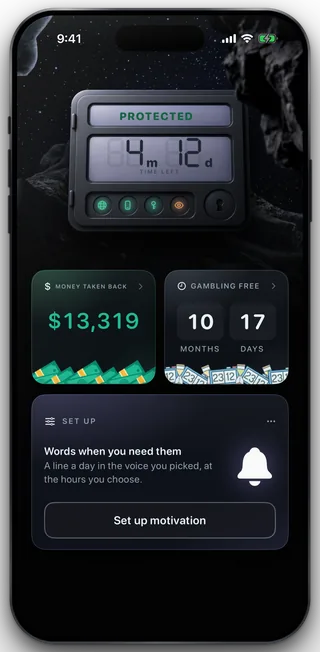
Protected
-
A layer is down
The word turns to NEEDS ATTENTION, the broken lenses go red and the door hangs off its hinge. One card takes the top of the stack, naming the single step back and what fixing it buys, with a count on the right when more than one thing is queued. A fault hides the setup tip and leaves the ledger where it is.
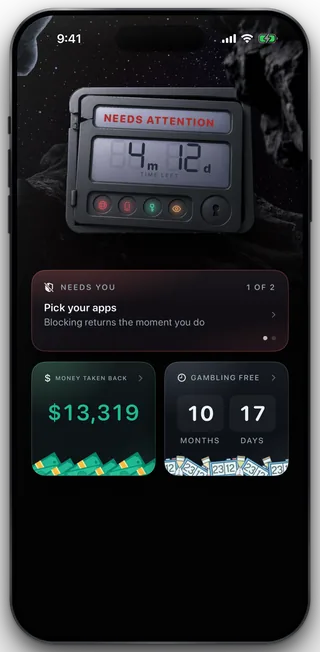
A fault
-
An exit is being decided
The word becomes EXIT REQUESTED and the keyhole stays empty, because nobody has granted anything. The card names the person deciding and the three positions of the request, from sent, through them, to the moment the apps open. Cancelling the request is the quiet secondary here, and it confirms first.
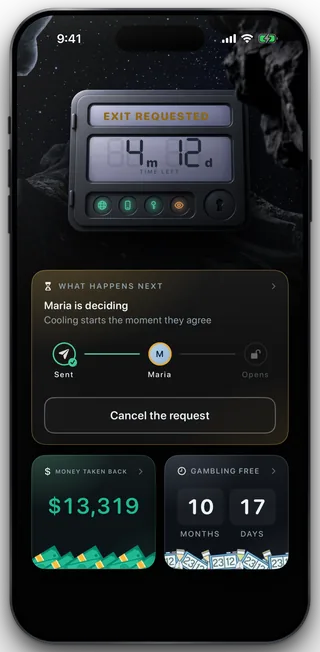
An open request
-
A payment lapsed
The word stays PROTECTED, because protection still holds. The card names the lapse, says how long it holds for and offers Renew. It says within three days rather than naming a date, because the phone learns about a lapse when it next reports, and an exact date could promise more protected time than the server will deliver.
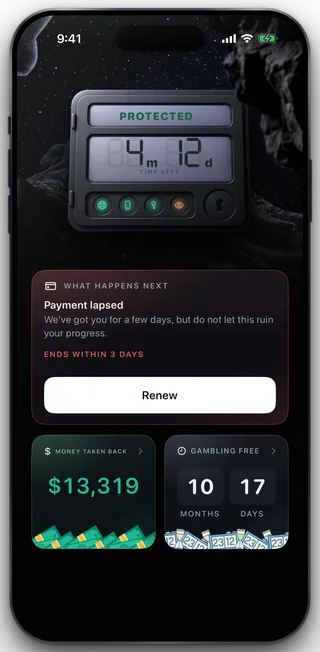
A lapse
-
Protection is off
The door is drawn open, the word reads OPEN, the readout dims to what you last held and the key sits in the lock. The card offers to start again. This face comes only from a release the server granted, never from the phone deciding anything.
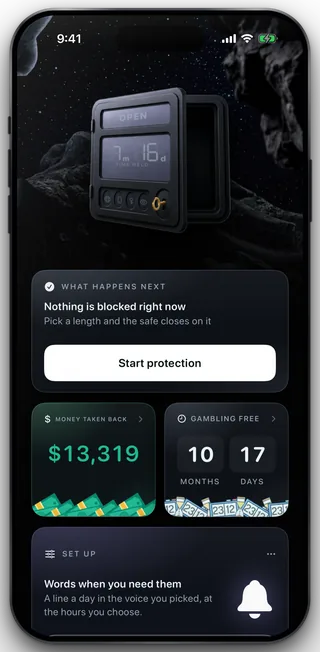
Off
The stack below
At most five cards render, in fixed slots that a state selects but never reorders: an attention card, a card for whatever process is running, the money and gambling free pair, and a setup tip. Both tiles in the pair are doors: money opens the receipt, gambling free opens the full run.
Home is the first of four tabs, beside Circle, Shield and Settings, with the SOS button sitting under all of them.
What this does not do
Home changes nothing. There is no way to end your term from it, no control over what is blocked, and no countdown on it that unlocks anything when it reaches zero: every one of those lives with the server, and the phone re applies what it is told. When the lock record cannot be resolved, Home says CHECKING and holds the last known lenses rather than guessing, and it prints no claim about how fresh that reading is, because it does not hold one honestly enough to print. And nothing on Home is evidence about a second phone, a desktop or a betting shop.
Still stuck? Email support@foldem.app and we answer within two working days.