How long is a term?
Updated September 2026
A term comes in two shapes: ongoing, which is the default and has no scheduled end, or fixed, which ends on a calendar date you pick at least one month away. There is no maximum length. You choose the shape during setup, and the term begins the moment you seal it, not when you pay. Your billing plan is a separate decision that never creates, shortens, extends or releases the term.
Two shapes, and the default is ongoing
A new commitment is ongoing unless you say otherwise. Ongoing is a real, typed shape with no scheduled end, not a missing date and not a placeholder: nothing counts down toward anything, and no day arrives on which the block lifts by itself.
The alternative is a fixed commitment. You pick an exact calendar end date, and it has to be at least one month away. No maximum applies, so a fixed term can be a month or a decade. Blocking holds through the day you chose, and the server stamps the exact end instant and stays the only authority on when it arrives.
Whichever shape you pick, the length is not what makes the block hold. The apps, the sites and the category shield are set separately, and the person holding your key is separate again.
Choosing it, and starting it
-
Pick the shape at Commitment
The Commitment screen asks how long the detox should last and offers two doors: Until I stop, which is the ongoing shape and is selected for you, and Fixed end date. Below them is one card between a minus and a plus. It shows an infinity mark while the term is ongoing, and the end date itself once you take the fixed door, where the two steppers move that date a month at a time and tapping the card opens a calendar. The line under the card states the consequence before you commit: leaving runs through your path, and its wait.
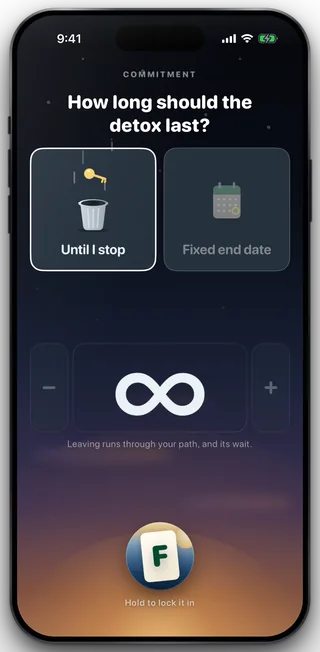
Choosing the shape
-
Seal it, and the term begins
The last screen of setup lists what you are about to commit to, one row each: the term, the apps, the websites and the keyholder. Sealing is what starts the term and applies the block. Paying does not start it, and the term you sealed is the one that runs, whatever plan you bought.
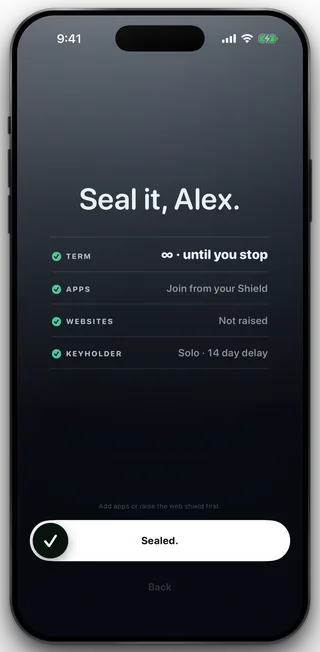
The seal starts the term
Your plan is not your term
Fold'em sells three subscription lengths: one month, three months and twelve months. That choice is independent of how long you committed to. Buying a one month plan does not give you a one month term, and buying a twelve month plan does not extend a term to a year. The app's own help says the same thing in one line: changing billing does not unlock your term.
The two are joined at exactly one point, and it runs the other way. If the subscription stops, the server opens a window and releases the block when it runs out, rather than the phone deciding anything. That is the lapse path and it has its own page.
Adding time is easy, cutting it short is not
A fixed term can be moved later at any time, for free, from the Extend screen. It is forward only: the picker starts the day after your current end date, so there is no way to use it to shorten anything. An ongoing term has no end date to move, so Extend has nothing to offer it.
Getting out before the end is the exit path, not a setting. You ask, your keyholder decides in person, and a wait of at least 72 hours starts from the moment they agree. With no keyholder the wait is 14 days. Neither number is affected by how long your term was.
What this does not do
Choosing a longer term does not block more things: the apps, the sites and the category shield are picked separately and a term of any length holds exactly what you sealed. A term does not renew itself into a second term, and it never turns an ongoing commitment into a dated one or the reverse. It cannot be shortened from this screen, from Settings, or by your keyholder, and it does not reach a second phone, a desktop or a shop.
Still stuck? Email support@foldem.app and we answer within two working days.